Vector search, embeddings, and why I stopped fighting my database
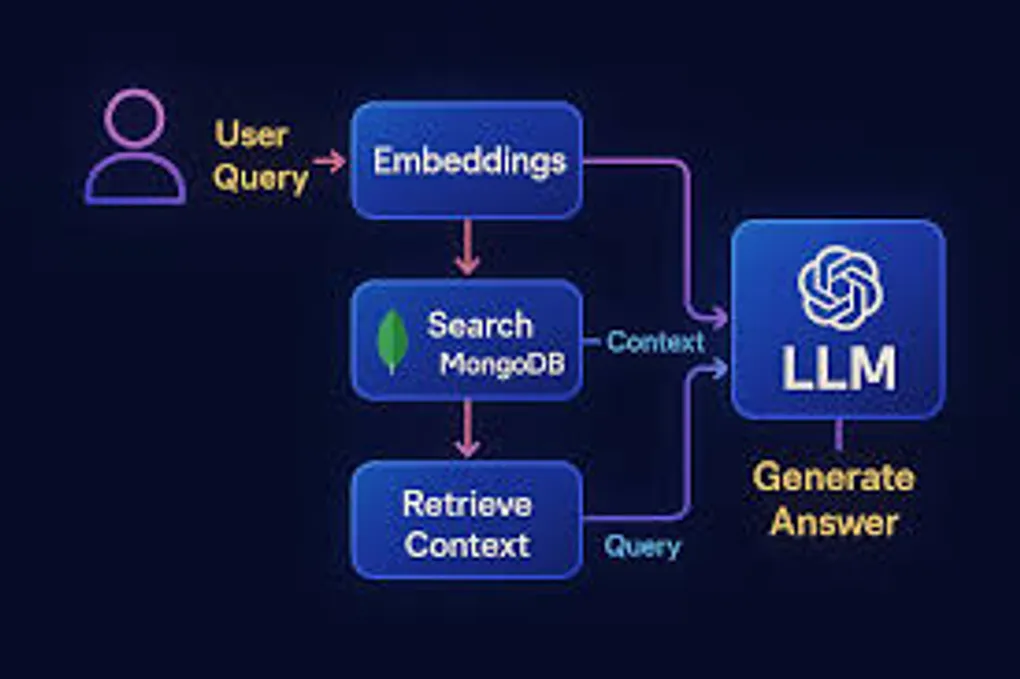
I built a RAG system that actually works in production, and honestly? MongoDB made it way easier than it had any right to be.
The Problem: LLMs Don’t Know Your Stuff
Look, GPT-4 is wild. It can write code, explain quantum physics, and probably pass the bar exam. But ask it about your company’s docs, your internal APIs, or literally anything specific to your domain? It just shrugs. “Sorry bro, wasn’t in my training data.”
That’s where RAG (Retrieval-Augmented Generation) comes in. Instead of hoping the LLM magically knows your stuff, you straight up tell it. The flow is:
- User asks a question
- You find the relevant docs from your database
- Stuff those docs into the LLM’s context
- LLM generates an answer based on YOUR data
- Profit
It’s like giving the AI a cheat sheet for every test.
Why MongoDB? (Or: How I Learned to Stop Worrying and Love My Database)
Real talk: I evaluated Pinecone, Weaviate, Qdrant, and the whole vector database crew. They’re all solid. But then I looked at our stack and realized we were already running MongoDB for literally everything else.
Why add another database? Another connection pool? Another thing that can fail at 3am?
MongoDB Atlas added vector search, and suddenly I could do semantic search in the same database where I’m already storing users, sessions, and content. Same queries, same monitoring, same mental model.
Game changer.
The Fun Part: Making It Work
Embeddings: Turning Text Into Math
First problem: computers don’t understand “user authentication documentation.” They understand numbers. Lots of numbers.
Enter embeddings. I used OpenAI’s text-embedding-3-small model to convert every doc into a 1536-dimensional vector. Each dimension captures some aspect of meaning. It’s like GPS coordinates, but for concepts instead of locations.
import { MongoClient } from 'mongodb';
import OpenAI from 'openai';

const openai = new OpenAI();
const client = new MongoClient(process.env.MONGODB_URI);

async function embedAndStore(doc: Document) {
  // Turn text into vector
  const embedding = await openai.embeddings.create({
    model: 'text-embedding-3-small',
    input: doc.content,
  });

  // Shove it in Mongo
  await client.db('ragcity').collection('docs').insertOne({
    content: doc.content,
    title: doc.title,
    metadata: doc.metadata,
    embedding: embedding.data[0].embedding, // The magic 1536 numbers
    timestamp: new Date(),
  });
}
Pro tip: chunk your docs. I went with 500 tokens per chunk with 50-token overlap. Why? Because if you embed an entire 50-page manual, the vector basically averages out to meaningless. Smaller chunks = better precision.
Vector Search: Math Makes It Fast
MongoDB’s vector search uses cosine similarity. Basically, it measures the “angle” between vectors. Similar concepts point in similar directions. Geometry class finally paying off.
The index config is stupidly simple:
{
  "fields": [
    {
      "type": "vector",
      "path": "embedding",
      "numDimensions": 1536,
      "similarity": "cosine"
    },
    {
      "type": "filter",
      "path": "category"
    }
  ]
}
That filter field though? That’s where it gets spicy. You can combine vector similarity with regular MongoDB queries. Only search engineering docs? Filter by date range? Mix semantic search with exact matches? Yeah, it does that.
Search That Doesn’t Suck
Here’s the actual search implementation:
async function search(query: string, filters?: any) {
  // Convert query to vector
  const queryEmbedding = await openai.embeddings.create({
    model: 'text-embedding-3-small',
    input: query,
  });

  // MongoDB aggregation pipeline goes brrrr
  const results = await client.db('ragcity')
    .collection('docs')
    .aggregate([
      {
        $vectorSearch: {
          index: 'vector_index',
          path: 'embedding',
          queryVector: queryEmbedding.data[0].embedding,
          numCandidates: 100,
          limit: 5,
          filter: filters || {},
        }
      },
      {
        $project: {
          content: 1,
          title: 1,
          score: { $meta: 'vectorSearchScore' },
          _id: 0,
        }
      }
    ])
    .toArray();

  return results;
}
The vectorSearchScore is clutch for debugging. You can actually see how confident the system is about each match.
The RAG Part: Assembly Required
Now we wire up the LLM:
async function ask(question: string, filters?: any) {
  // Get relevant docs
  const docs = await search(question, filters);

  // Build context from top matches
  const context = docs
    .map(d => `## ${d.title}\n${d.content}`)
    .join('\n\n---\n\n');

  // Ask the LLM with context
  const response = await openai.chat.completions.create({
    model: 'gpt-4',
    messages: [
      {
        role: 'system',
        content: 'You are a helpful assistant. Answer based on the provided context. If you don\'t know, just say so. No hallucinations.'
      },
      {
        role: 'user',
        content: `Context:\n${context}\n\nQuestion: ${question}`
      }
    ],
  });

  return {
    answer: response.choices[0].message.content,
    sources: docs.map(d => ({ title: d.title, relevance: d.score })),
  };
}
The sources are key. Users can verify the answer came from real docs, not AI fever dreams.
Stuff I Learned the Hard Way
Hybrid Search or Die
Pure vector search is great until someone searches for an exact product code or API endpoint. I added MongoDB text search and merged the results:
// Combine vector search with text search
const vectorResults = await vectorSearch(query);
const textResults = await textSearch(query);
const merged = reciprocalRankFusion([vectorResults, textResults]);
Reciprocal Rank Fusion is a fancy way of saying “merge two ranked lists intelligently.” Works surprisingly well.
Cache Everything
Generating embeddings costs money and takes time. I cache query embeddings in Redis:
const cacheKey = `emb:${hashQuery(query)}`;
let embedding = await redis.get(cacheKey);

if (!embedding) {
  embedding = await openai.embeddings.create({...});
  await redis.set(cacheKey, JSON.stringify(embedding), 'EX', 86400);
}
Went from 300ms to 20ms for repeat queries. Users noticed.
Watch for Garbage In, Garbage Out
RAG fails silently. The LLM will generate confident-sounding nonsense if you feed it irrelevant docs. I track:
- Queries where max relevance score < 0.7 (probably bad matches)
- User thumbs down on answers
- Embedding API costs (OpenAI charges per token)
Set up alerts. You’ll thank me later.
Chunking is an Art Form
My first attempt chunked on paragraph breaks. Disaster. Some paragraphs were 3 words, others were 500. Embedding quality was all over the place.
I switched to semantic chunking using sentence transformers to detect topic shifts. Quality jumped immediately. Turns out documents have structure; who knew?
The Numbers
Two months in production:
- 87% question resolution without human intervention
- 1.2s average response time (including LLM generation)
- ~$15/month for embeddings (50k queries)
- Users actually like it (shocking, I know)
Should You Build This?
If you’re on MongoDB already? Absolutely. The developer experience is smooth, and not having to manage another database is worth it alone.
If you’re starting fresh? Still worth considering. MongoDB’s vector search is production-ready, the tooling is mature, and you get a real database with transactions, aggregations, and all the features you’ll eventually need.
The Reality Check
RAG isn’t magic. It’s vector math + prompt engineering + hope. But when it works, it’s genuinely impressive. Users ask questions in natural language and get accurate answers with citations.
Is it perfect? Nah. Sometimes it whiffs on weird queries. Sometimes users ask things that aren’t in the docs. But it’s way better than keyword search, and it keeps getting better as we add more documents.
Welcome to RAG City. The rent is cheap and the embeddings are fresh.